Build your own project management app without writing code
Give your team a real iOS and Android app for projects, tasks, deadlines and time tracking. Set it up in an afternoon, publish it under your own name, and stop paying per seat for software that was never built around how you work.
From empty workspace to a live team app in four steps
There is no template to wrestle with and nothing to install. You add the feature, name the things your team already says out loud, invite people, and publish.
Add the feature
Turn on Project Management in the editor. Boards, tasks, roles, time tracking and reporting are all included from the start, with sample projects so the app is never empty.
Make it yours
Pick a theme, set your colours, and rename every label. If your team says jobs, matters or shoots instead of projects, the app says that too.
Invite your team
Everyone who signs up in your app appears in one list. Give each person a role, put them on projects, and assign work straight to them.
Publish it
Send it to the App Store and Google Play under your own developer account, or share it as a web app. Your team installs it like any other app.
Everything is managed from one dashboard
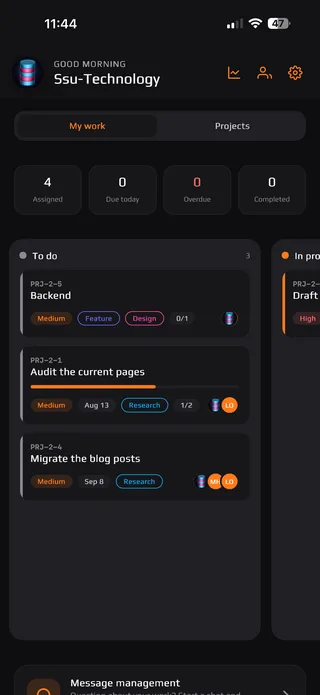
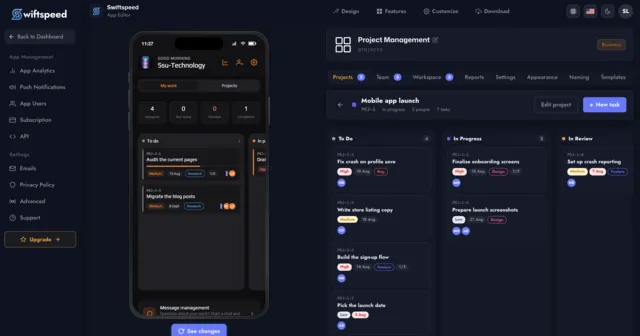
You do not need to be inside the app to run it. Create projects, break them into tasks, assign the right people and watch progress from the same editor where you build the rest of your app.
A complete system, not a to-do list
Everything a small team needs to plan work, share it out and prove where the hours went, built in from the first day.
Boards that match how your team actually moves
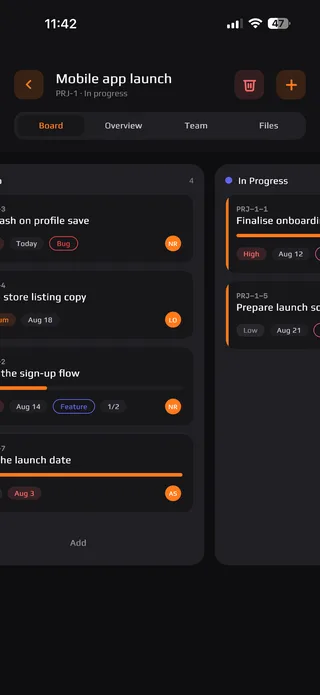
Drag a card from To do to In progress to Done and the status follows. Three layouts ship with the feature, so the same projects can be a board, a schedule or a calendar depending on who is looking.
Time tracking
Start a timer on a task or log hours by hand. Every entry is kept and exportable.
Nobody misses work
Assign a task and the person gets a push notification and an email, in your wording.
Roles that mean something
Admin, manager and member each see a different app. You stay in control of all of it.
Reporting you can hand to a client
Completion rate, overdue work, tasks by status and priority, and a contribution figure per person. Read it in the editor or inside the app, and export the underlying time log to a spreadsheet.
Subtasks
Break big jobs into checkable steps
Due dates
With reminders before the deadline
Comments
Discussion kept on the task itself
Attachments
Files where the work is happening
Clients
Group projects by who they are for
Priorities
High, medium and low at a glance
Workload
See who is carrying too much
Activity log
A record of what changed and when
What your team sees
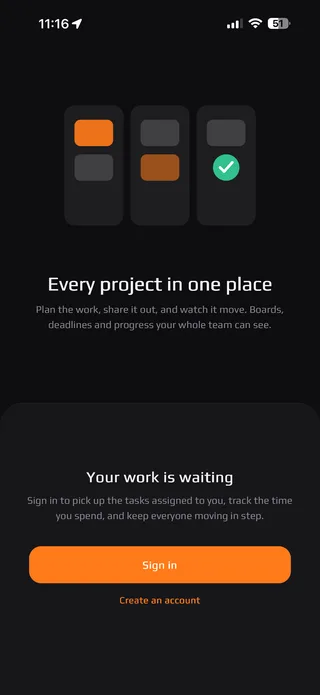
Six themes ship with the feature, in light and dark. Every screen below is the real app, running on a phone.
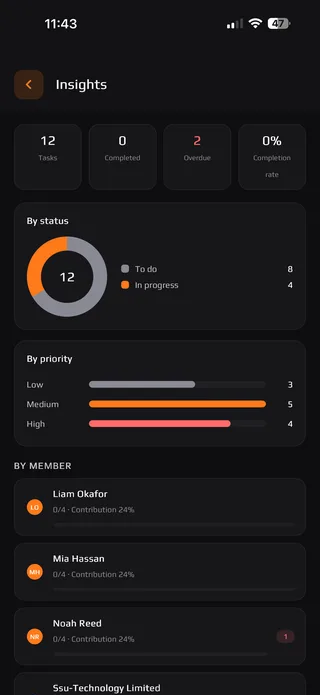
One system, shaped around your kind of work
Because every label is renameable and every module can be switched off, the same feature becomes a very different app depending on who is using it.
Construction and trades
Track sites, crews and snag lists. Log hours on the job and show the client where the week went.
Agencies and studios
Run client work by account, keep briefs and files on the task, and export billable time at month end.
Field and service teams
Send jobs to the person nearest the work, with due dates, priorities and proof of completion.
Property and facilities
Turn maintenance requests into scheduled tasks and keep a record against each building.
Remote and hybrid teams
One place for who is doing what, without another chat thread nobody reads.
Professional services
Matters, cases or engagements, tracked to a deadline with the hours recorded alongside.
Events and production
Run-of-show tasks, crew assignments and a countdown everyone can see on their phone.
Nonprofits and community
Coordinate volunteers and programmes without paying per seat for every helper.
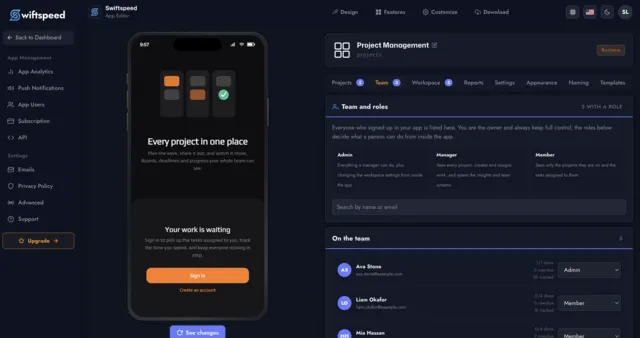
Everyone who signs up is already on your team list
There is no separate invite system to manage. Anyone who creates an account in your app shows up in the editor, and you decide what they can do from there. You are the owner and always keep full control.
Admin
Everything a manager can do, plus changing the workspace settings from inside the app.
Manager
Sees every project, creates and assigns work, and opens the insights and team screens.
Member
Sees only the projects they are on and the tasks assigned to them.
Know where the work and the hours went
Progress is not a feeling. Every task, deadline and logged hour rolls up into charts you can read in seconds, in the editor and inside the app.
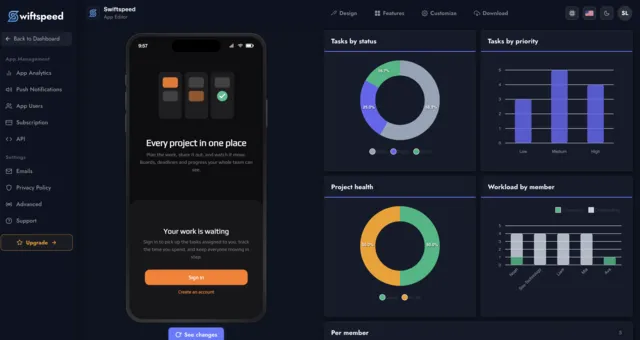
The reporting tab in the Swiftspeed editor, showing task status, priority, project health and workload by member
Status at a glance
How much is still to do, in progress and finished, per project and across the whole workspace.
Workload by person
Completed against outstanding for every member, so you can see who is overloaded before it becomes a problem.
Export to a spreadsheet
Download the full time log as a file whenever you need to invoice, report or reconcile.

Ship it to the stores under your own name
Your team should not have to log into someone else's product. Publish your project management app to the App Store and Google Play with your icon, your name and your branding, or hand it out as a web app in seconds.
Your own app, or another per-seat subscription
What people ask before they build
No. You add the feature in the editor, set your colours and wording, and invite your team. There is nothing to install, host or maintain, and no developer involved at any point.
Give your team the app they actually need
Stop stretching a spreadsheet and stop paying per seat for something built for someone else's workflow. Build it once, put your name on it, and hand it to your team this week.