Loyalty Feature
Plan and POS expectations
The Loyalty feature is on the Business plan. It works on its own with the in-app QR member card and admin-side points adjustments, but the full value of loyalty (automatic earning on purchase, redemption at the till) only kicks in once your POS or ERP calls the inbound API endpoints. The integration is a clean REST contract with HMAC-signed outbound webhooks for live events. If you're migrating from a legacy platform, the Siberian compatibility shim accepts the old payload shapes with just a URL change.
What is the Loyalty Feature?
The Loyalty feature is a complete retention programme for your mobile app. Customers get a QR member card the moment they open the loyalty screen for the first time (no separate signup), they earn points or stamps as they spend with you, and they redeem against a catalogue of rewards that mints single-use vouchers with a QR your POS can scan. Three programme models, four mobile layouts, six themes, automatic birthday wishes, custom profile fields, and a clean inbound + outbound API for any POS or ERP that wants to talk to it.
The intent is to be the loyalty platform your existing POS plugs into, not a closed silo. Every customer-visible interaction (earn, redeem, voucher use, tier change) emits a signed webhook. Every admin action (manual points adjustment, member create/delete, reward redemption) is auditable. Customers can use the app fully offline - the QR card renders without a network - and the moment they connect again, balances reconcile.
Three Programme Models
Pick how customers earn. You can switch between models later without losing existing data - points are preserved, stamps are converted by the conversion rules in the Programme tab.
- Points (default): Earn N points per €/$ spent. Best for cafés, retail, and services where every euro matters. Set
points_per_currencyto anything (1.0, 0.5, 2). Customers redeem against the rewards catalogue. - Stamp card: Buy 10 (or 4-20), get 1 free. The single-product perk loop everyone recognises. The card resets when filled, so customers see clear progress every visit. Best for haircuts, coffee, car wash - one product, repeat purchase.
- Tiered: Bronze → Silver → Gold ladder driven by lifetime points. Each tier carries an earn-rate multiplier (Gold @ 1.5× → €10 receipt earns 15pts instead of 10). Best for VIP / status programmes where customers chase the next badge.
On top of the model, an optional visit bonus awards N points per app-open per day (idempotency-keyed so opening the app 50 times only counts once). And an optional signup bonus drops a fixed number of points when a customer first lands on the loyalty screen.
Adding the Loyalty Feature to Your Mobile App
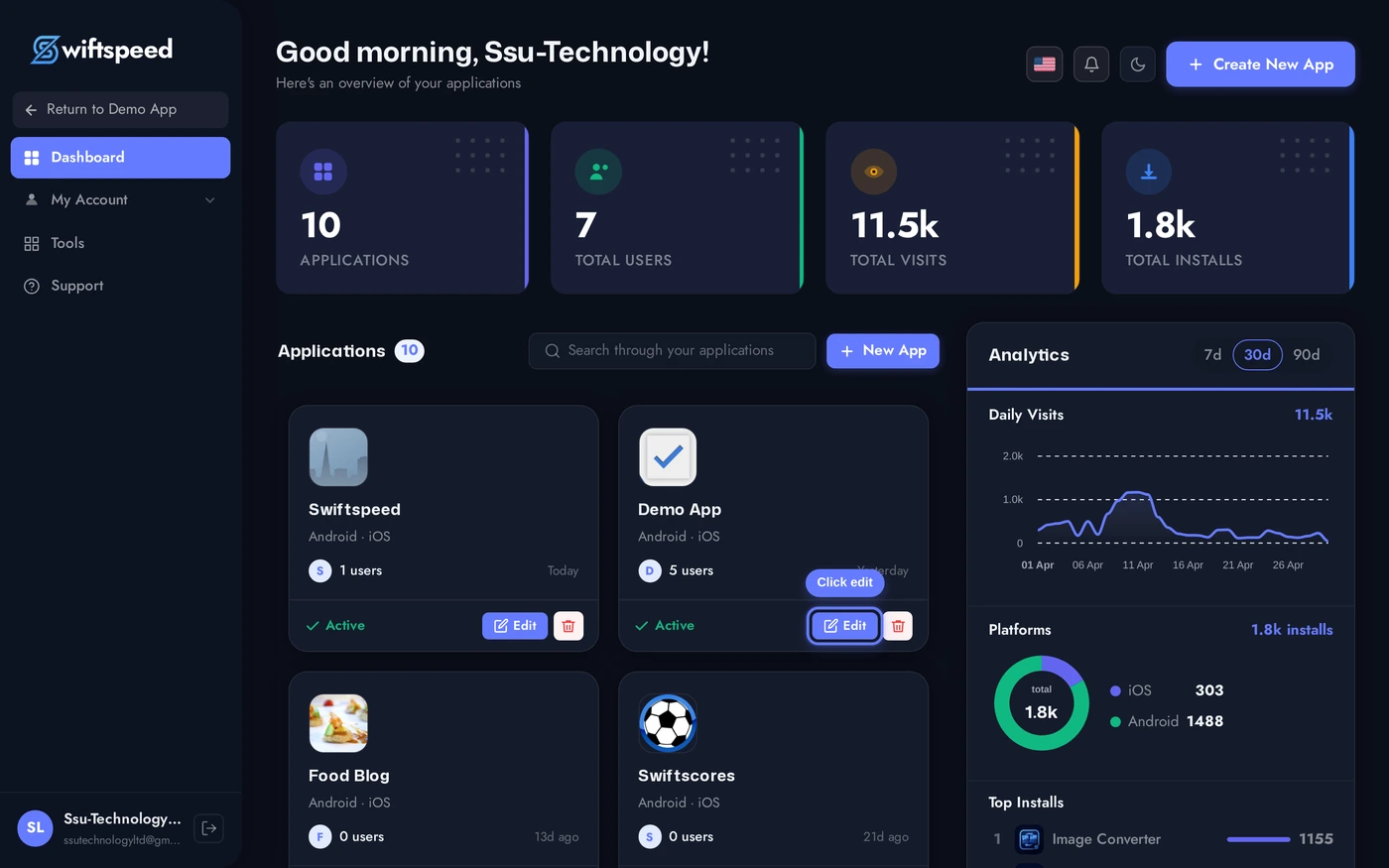
From your Swiftspeed dashboard, click the edit pencil on the mobile app you want to add a loyalty programme to.
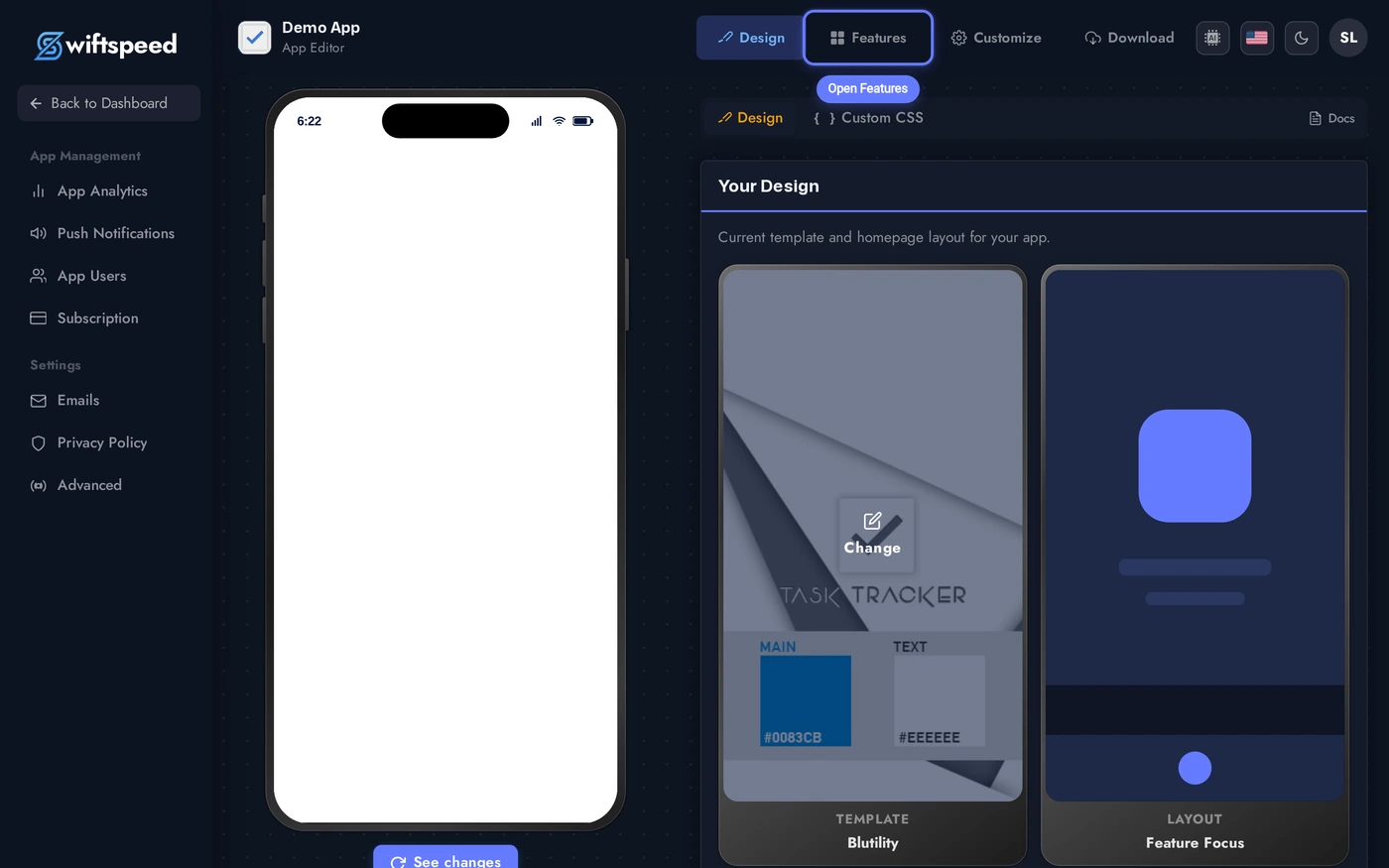
In the App Editor, open the Features tab. That's the catalogue of every page in your native mobile app.
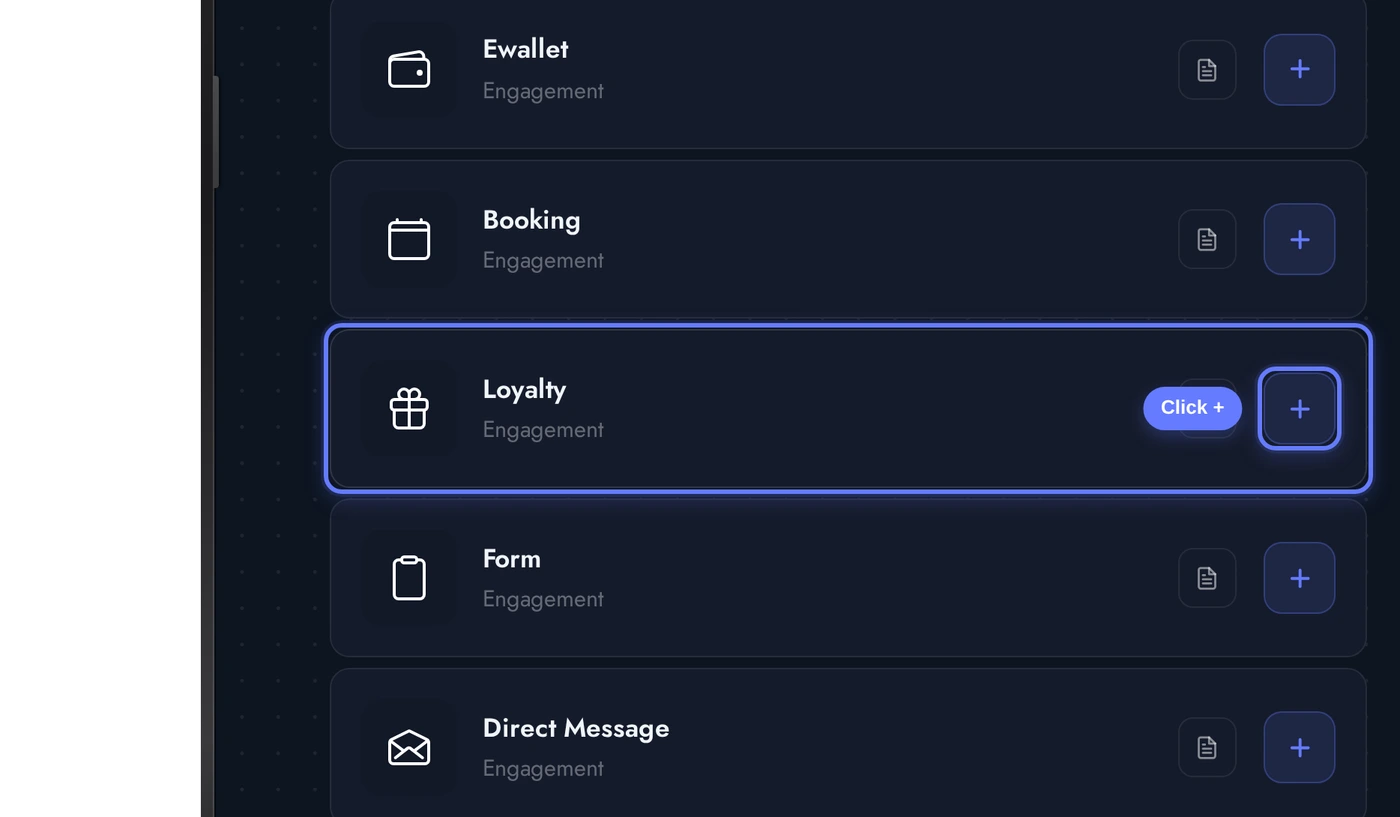
In the Add a Page list, find the Loyalty card and click the + button on its right. The editor seeds three default rewards and a starter tier set the moment the feature is added so the editor lands on a populated state.
The Programme Tab
When the Loyalty editor opens, the Programme tab is the default workspace. This is where you choose the model and dial in the earning rules. Cards top-to-bottom:
Every change autosaves on a short debounce. The phone preview to the left re-renders in place - switching from Points to Stamp card immediately swaps the balance card to a stamp grid without a manual save.
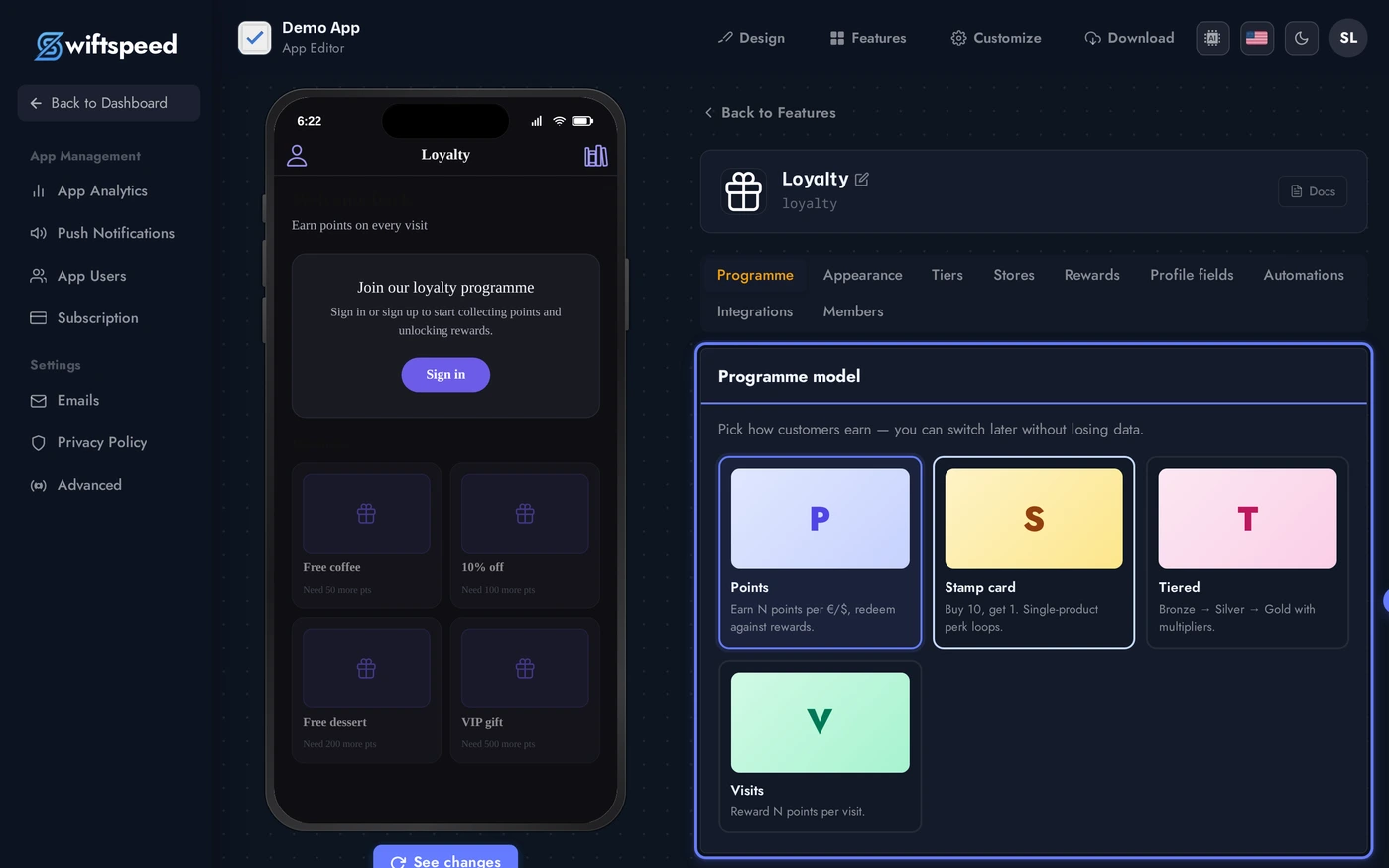
- Programme model: pick Points / Stamps / Tiered. The card you click highlights and the Earning rules card below adjusts to match.
- Earning rules: currency code (drives the cost-label symbol), points-per-currency rate (Points + Tiered), stamps-per-card and reset behaviour (Stamps), visit bonus, signup bonus.
- History retention: 7 (default) / 10 / 30 / 60 days. Older customer-visible activity is pruned by the daily cron at 4am. The admin still sees the full audit trail in the Members tab - only the customer view is trimmed.
- At a glance: live programme stats - total members, transactions in last 30d, active vouchers, outstanding points liability.
Designing the Loyalty Pages (Themes and Layouts)
The Appearance tab controls how the loyalty pages render on the phone. Two independent knobs:
Click any theme card to apply. The loyalty home, balance card gradient, reward grid, and every sub-screen update in place - no rebuild required.
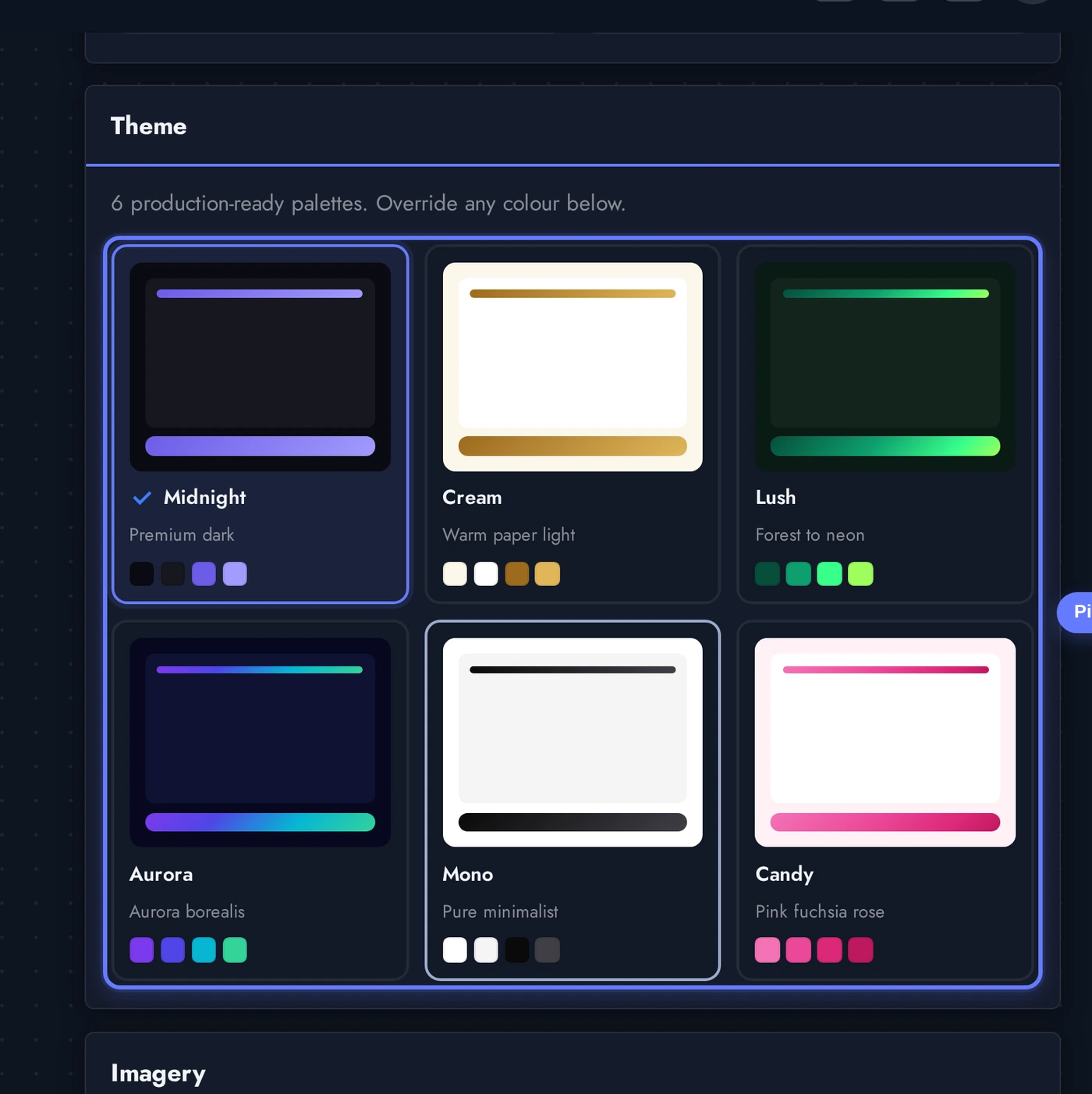
- Theme (six built-in palettes):
Midnight(premium dark navy),Cream(warm paper light),Lush(forest emerald + neon green),Aurora(purple→cyan→teal),Mono(pure black/white),Candy(pink fuchsia rose). Each theme drives the accent gradient on the balance card, the surface and text colours, and the shimmer skeletons that play during loading. - Layout (four mobile structures):
Classic(default - balance card on top, reward grid below),Dashboard(stats hero with Earned / Redeemed / Lifetime + reward grid),Stampbook(filled-vs-empty stamp grid with progress - pair with Stamp card model),Wallet(Apple-Wallet-style stacked passes with QR per pass). - Custom colours: per-token overrides on top of the chosen theme. Set just the accent if you want to match a specific brand colour and leave the rest untouched. Each colour has a Reset chip that drops back to the theme default.
- Section visibility: toggle which sub-screens show - History, Stores, QR card, Scan-to-earn, Referral, Tier ladder, Rewards catalogue. Hide what doesn't fit your programme so the customer's home stays uncluttered.
Tiers, Rewards, and Stores
Three sibling tabs round out the customer-visible content:
- Tiers: lifetime-points thresholds with an earn multiplier. Bronze 0pts × 1.0, Silver 500pts × 1.25, Gold 2000pts × 1.5 is a sensible starter ladder. Each tier has a colour for the badge dot, an optional badge image, and a free-text benefits description. The customer sees a progress bar to the next tier on the balance card.
- Rewards: the catalogue customers spend points (or stamps) on. Each reward has a name, optional description, cost, voucher expiry (default 30 days), optional minimum tier (gates premium rewards), optional stock limit (caps total redemptions), and an optional reset-on-redeem flag for stamp-card cycles. Image upload uses an inline cropper so the reward art always sits perfectly in the catalogue grid.
- Stores: branches / POS terminals. Each store gets a unique POS token (shown once on create - copy it straight into your POS configuration), an optional address + geo coordinates (so the Stores sub-screen tap-opens Google Maps), and an Active toggle. Inactive stores are hidden from the app and their POS tokens are rejected by the inbound earn / redeem endpoints.
Custom Profile Fields
The Profile fields tab lets you collect any custom data you want from members at signup or in their profile screen. Fields are typed (text / email / tel / number / date / select / multiselect / checkbox / textarea), optionally required, and surfaced under the Customer Account feature's Loyalty profile tab as well as during signup.
Reserved keys that the platform already collects on the customer record (name, firstname, lastname, email, mobile, phone, nickname, birthdate, dob, password and common synonyms) are stripped automatically server-side and flagged red in the editor. Don't duplicate them.
Birthday Automation
The Automations tab is where birthday wishes happen. Two rule types:
- On-birthday: fires on the customer's birthdate at the time you choose. Push notification + optional email. Can award points (most cafés do +50 birthday points). Tap-action picker lets you route the push to a specific feature in the app or to a custom URL - same engine the regular push notifications use.
- DOB reminder: nudges customers who haven't set a birthdate yet, so the on-birthday rule has data to fire on. Useful for migrated programmes where DOB wasn't captured.
Both rule types fire daily via the loyalty cron (app:loyalty:birthdays, hourly). The badges on each rule row show last-run, total sent, send time, days-before window, and points awarded - auditable from one screen.
POS and ERP Integration
The Integrations tab is where the programme stops being an in-app curiosity and starts driving revenue. Toggle Enable external integration and you get:
- Inbound API endpoints under
/api/v1/loyalty/{appKey}/...-earn(award points from a receipt),redeem(burn points with or without a reward_id),balance(look up by card / phone / email),voucher/validate(mark a voucher used at the till),voucher/refund(reverse a voucher),customers(cursor-paginated member sync). Each endpoint accepts anIdempotency-Keyheader so retries are safe. - API keys with per-key permissions (
earn/redeem/read/adjust/sync). Plain key shown once on create or rotate. Per-IP allowlist + per-second rate limit configurable per key. - Outbound webhooks with HMAC signing. Pick which events you want pushed (customer enrolled, customer updated, points earned/redeemed/expired/adjusted, voucher issued/used, tier changed). Failed deliveries retry with exponential backoff (1m → 5m → 15m → 1h → 6h → 12h then dead-letter).
- Compat shim for Siberian / Useappility migrations:
/api/v1/loyalty/compat/siberian/{appKey}/add_points,/redeem_points,/customer_points. Same payload as the legacyadd_points.php- just change the URL.
The Send test event button POSTs a synthetic customer.enrolled event so you can verify your endpoint is reachable, signature is valid, and your handler responds 2xx. The Show recent deliveries log shows the last 50 delivery attempts with their HTTP code and response body for debugging.
Members and Manual Adjustments
The Members tab is the daily-driver browser. Search across card code, name, email, or phone (debounced live search). The table renders 20 members per page with their balance, lifetime points, last earn timestamp, and per-row controls:
- Adjust: open a points adjustment drawer. Positive delta tops up, negative delta deducts. Reason field is required and lands in the audit trail. Lifetime is only bumped on positive deltas - negative deltas reduce balance but don't reduce lifetime (so tier history stays consistent).
- Delete: removes the member, their voucher redemptions, and their transactions for this programme only. The customer record stays - they may exist for other features in the same app or for other apps. Confirmation modal explains the consequences before executing.
- Add member: enrol someone manually. Provide email + first name (and optionally last name + mobile). If a customer with that email already exists in the app, they're simply enrolled. Otherwise a new customer account is created with a random temp password - the customer can use "Forgot password" to claim it.
- Bulk delete: select rows with the per-row checkbox + the "select all" header checkbox, then click the red "Delete N selected" button next to the search box. Same confirmation modal handles single + bulk.
Live Preview of the Loyalty Home
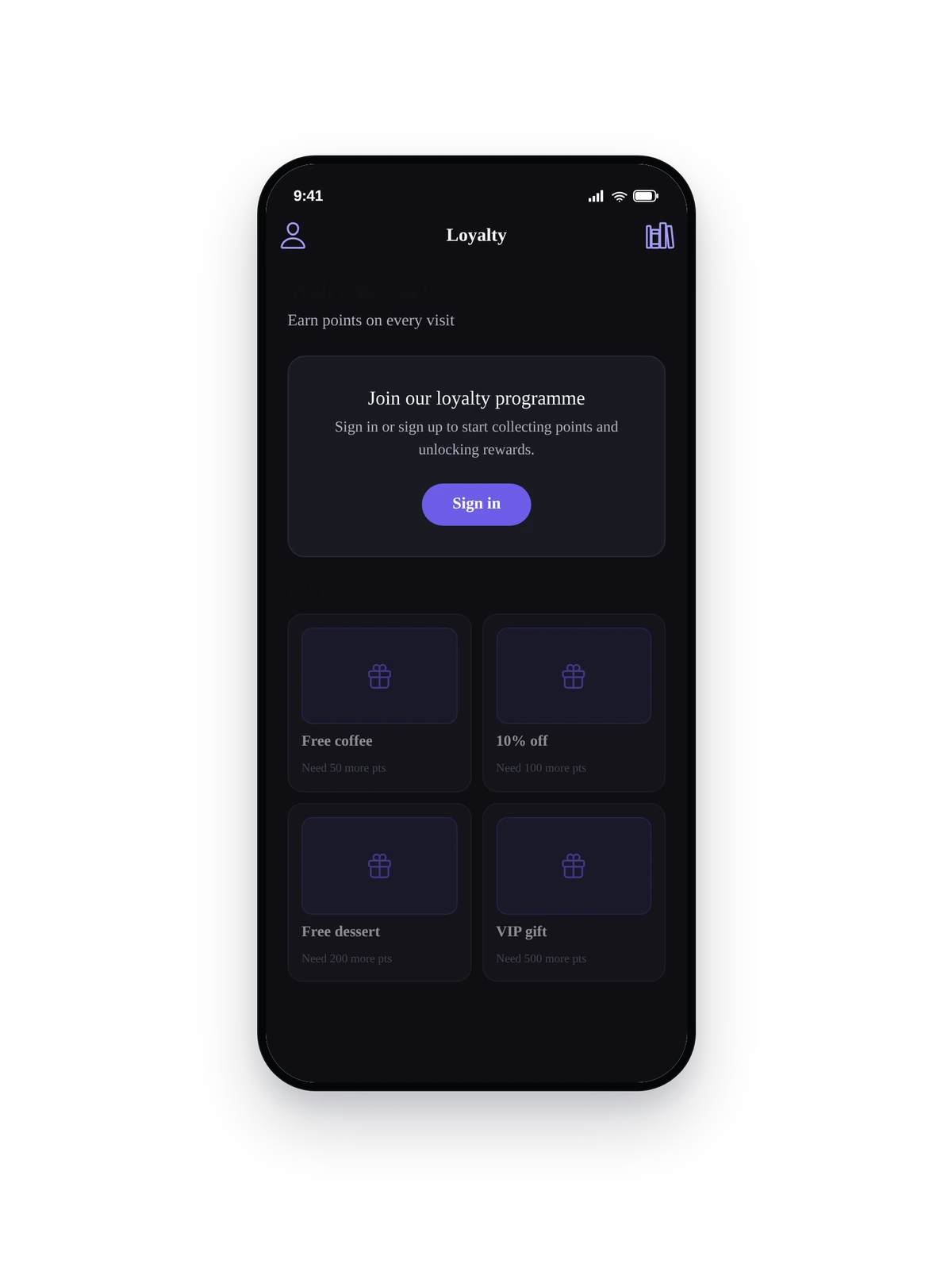
Here is the seeded loyalty programme rendering inside a real phone running the converted native loyalty home:
This is the actual native UI of the loyalty page, not a mockup. The QR badge in the top-right opens the full member-card sub-screen, History and Stores chips drop into their own pages, and the reward grid is tap-to-redeem (disabled rewards show "Need X more pts" instead of the cost). Replace the seeded rewards and tiers with your real programme details and ship to the App Store and Google Play.
Tips and Troubleshooting
- Visit points = 0 by default. Opening the app does not credit points unless you explicitly set
visit_points > 0in the Programme tab. The visit is logged either way (so the daily-active counter is real), but no points hit the balance until the admin opts in. Most programmes leave this at 0 and rely on POS-driven/earncalls instead. - Programme switching is non-destructive. Going from Points to Stamps preserves balances; going from Stamps to Points converts cards to a sensible point equivalent. Tiered ↔ Points keeps lifetime points exactly intact. Only changing
points_per_currencymid-flight needs care - it doesn't retroactively recompute past txns, only future ones. - One reward = one voucher per redemption. Each redemption mints a single-use coupon code with a QR that the POS scans. Voucher expires after
expiry_days. Already-issued vouchers keep working until they expire even if you delete the reward. - POS tokens are one-time-shown. When you create or rotate a store's POS token, the plain token appears once in a drawer. Copy it straight into your POS configuration. If you lose it, rotate - but rotating immediately invalidates the previous token, so coordinate the swap with the till.
- Birthday automation needs DOB. The on-birthday rule only fires for customers whose
birthdateis set. Use a DOB reminder rule alongside the on-birthday rule for migrated programmes where birthdates weren't collected. - Phone-suffix matching for POS earn calls. If your POS sends mobile numbers without the country code, set the Phone normalisation dropdown in Integrations to the right country (GR, UK, US, DE, FR). The inbound API will match
+30 21 123 4567against21 123 4567in your customer table. - The customer is auto-enrolled on first loyalty open. No separate signup flow. The moment a logged-in customer taps the loyalty tab, a
loyalty_membersrow is created with a unique card code and the configured signup bonus is credited. Anonymous visitors see the guest sign-in prompt. - Migrating from Useappility / Siberian / Belly / FiveStars / Square Loyalty? The
app:migrate-useappility-appconsole command pulls customers (loyalty-enrolled only), settings, stores, rewards, members, last 2 transactions per member, active vouchers, and birthday rules from a source database. Strict allowlist - no junk imported. Already used to migrate Coffee Love and Fuel Points end-to-end.